Drive mapping using ‘net use’ fails.
I had a user today who couldn’t access our file server over our VPN. Like most Windows-based companies we have a
batch file that users run after the VPN connection is made, which quickly maps all the network drives using the net
use command. VPN problems are annoying too since these problems almost never
occur except when users are working remotely, and all diagnosis & solving has to be
done over the phone. Anyways… The VPN client showed that it was, in fact connected, so
no problem there. A quick use-check of other services (email, intranet) confirmed that
the problem was on his client and not on the server. I then scrutinized the execution of
the batch file itself by adding a pause command at the end so we could see
what was going on before it finished executing and closed. It seemed that each net use
command failed with this error:
'NET' is not recognized as an internal or external command, operable program
              or batch file
So evidently, it simply couldn’t find the net program, which is weird,
because it is a standard Windows command. The file net.exe was located right where it
should be (in C:\Windows\system32). This is where a knowledge of the old
DOS
days still comes in handy even in the 21st century. DOS had a system setting called the
PATH, which told it which folders to look in when the user typed in a
command. The PATH environment variable
persists in Windows’ use of command-line programs to this day, and when the command
prompt tells you it can’t recognize a file you know is there, you can be sure the
PATH has become messed up somehow. To view and change your
PATH setting:
- Right-click My Computer and hit properties
- Click the Advanced tab
- Click the Environment Variables button at the bottom
- In the list at the bottom, click on the Path entry
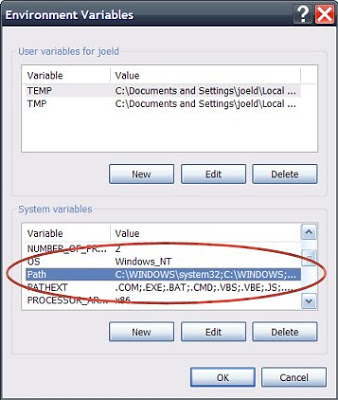
The first thing in that string should be C:\WINDOWS\system32;C:\WINDOWS;
and—wouldn’t you know it—in this case it wasn’t. It turns out the user had had to run a
“repair installation” tool for AutoCAD the day before, and apparently this tool had
replaced the Path setting with it’s own value instead of simply
adding its value on to the end as it should have done. The result was that the
Windows and system32 folders, where all the standard commands
reside, was no longer on Windows’ own list of places to check for commands &
programs to run. To fix: select Path (still in the window shown above), click the Edit
button, and paste the following string into the beginning of the “Variable Value”
field (do not replace the entire string):
%SystemRoot%\system32;%SystemRoot%;
Then click OK to close out of all the dialog boxes, no need to restart. After doing
this, the net use command worked properly and the drives all mapped without
a hitch. Final note: this problem was caused by the installation repair tool in Autodesk
Architectural Desktop 2005. Newer versions of this software may have fixed the problem,
but it is the kind of thing that any program could easily get wrong, causing the same
issue and possibly breaking other aspects of your usage as well.